 Benny Morgan
 Karla Spencer
When parents search for a monitoring solution, they don’t just compare features — they compare intent. Queries like “Is uMobix legit?” “Is uMobix safe?” “uMobix vs parental control apps,” or “Can uMobix monitor Instagram and WhatsApp?” reveal a deeper concern: protection versus surveillance.
This uMobix review examines whether uMobix should be classified as a full spy app or a responsible parental control solution — and more importantly, whether it deserves to be trusted.
Understanding uMobix: Spy Tool or Parental Control?
uMobix markets itself as a monitoring app designed primarily for parents who want visibility into their child’s smartphone activity. It offers access to call logs, text messages, contact lists, GPS location tracking, browsing history, and activity across platforms like WhatsApp, Instagram, and Facebook Messenger.
A spy app typically emphasizes stealth, covert monitoring, and deep data extraction. A parental control app, on the other hand, prioritizes digital safety, screen-time management, content filtering, and responsible oversight. The difference lies in purpose, transparency, and ethical usage.
uMobix leans heavily toward real-time tracking and direct data access. In some configurations, it operates discreetly in the background. This raises critical questions:
- Is it legally compliant when used by parents?
- Does it protect sensitive data through encryption?
- Does it require rooting or jailbreaking?
- Is it balanced enough for digital wellness, or purely surveillance-focused?
Evaluating Legitimacy and Safety
Legitimacy in the monitoring software space depends on three pillars:
- Legal Use Case – The app must be used on a device you own or with explicit consent. Unauthorized monitoring is illegal in many jurisdictions.
- Data Security – Sensitive information such as private messages and GPS data must be transmitted securely.
- Transparency & Support – Clear pricing, refund policies, and responsive customer service signal a credible provider.
Because phone monitoring software sits at the intersection of cybersecurity, privacy law, and parental responsibility, evaluating uMobix requires more than a feature checklist. It requires understanding how the app handles data, how it installs, and whether its architecture prioritizes security or stealth.
| 👍 Pros | 👎 Cons |
| Deep monitoring features for calls, messages, social apps, and more | Some features experience delays or sync issues |
| Stealth mode available for discreet tracking | Higher pricing compared to many competitors |
| User-friendly dashboard that’s easy to navigate | |
| Keylogger and screen recorder included | |
| Wide compatibility with popular social media apps |
How We Test and Rate Top Spy Apps
Here’s exactly how we evaluate every Phone spy apps to make sure it’s reliable, safe, and truly worth using.
- Functionality – Do all advertised features (calls, SMS, social apps, location) work reliably on Android and iOS?
- Usability – How easy is it to install/configure, how intuitive is the dashboard, and is the performance smooth?
- Stealth & Compatibility – Does it work covertly (when appropriate), and is it compatible with the latest Android/iOS versions?
- Support & Reliability – Quality of customer support, update frequency, and real-world reliability.
- Cost & Value – Subscription pricing, what you get for the money, how it compares to competitors.
- Legal & Ethical Considerations – Is it legal to use in your jurisdiction and for your use case? Are there ethical concerns?
Top uMobix Alternatives
| Feature / Service | mSpy | Eyezy | ClevGuard | Spynger |
|---|---|---|---|---|
| Our Review | Read mSpy Review | Read Eyezy Review | Read ClevGuard Review | Read Spynger Review |
| Starting Price | $49.99/month | $38.39 / month | $49.99 / month | $47.10 / month |
| Free Trial / Demo | Demo available | Demo available | Demo available | Demo available |
| Money-back Guarantee | 14 days | 14 days | 30 days | 30 days |
| Number of Devices | 1 per license | Not specified | Not applicable | 1 per license |
| Supported Platforms | Android, iOS | Android, iOS | Android, iOS, Web | Android, iOS |
| Screen Recorder | ✔️ | ✔️ | ✔️ | ✔️ |
| Ambient Sound Recorder | ✔️ | ✔️ | ✔️ | ❌ |
| Parental Control Tools | ✔️ | ✔️ | ✔️ | ✔️ |
| Keylogger | ✔️ | ✔️ | ✔️ | ✔️ |
| Call Recording | ✔️ | ✔️ | ✔️ | ✔️ |
| GPS Tracking | ✔️ | ✔️ | ✔️ | ✔️ |
| Social Media Monitoring | ✔️ | ✔️ | ✔️ | ✔️ |
| Website Blocker | ✔️ | ✔️ | ✔️ | ❌ |
| Link | Get Started | Get Started | Get Started | Get Started |
What is uMobix?
uMobix is a Mobile-monitoring/Family Tracking App designed to give “remote insight” into a target device (Android or iOS). It offers features like tracking calls, messages, social-media activity, location, browsing history — and operates in a stealth mode (especially on Android) so the target user may not know the monitoring is happening. On its website, the vendor positions it as a tool for “protecting the ones you love” by checking device activity.
📥 How to Install uMobix on Android & iOS
I found the process of downloading uMobix on both iOS and Android straightforward and hassle-free. The installation went smoothly, making it an easy and convenient way to get started with the service.
Method 1) How to Install uMobix on an Android Device
Step 1) Sign up for uMobix
Create an account on the uMobix website and choose the Android subscription plan.
Step 2) Access & Prepare the Target Device
Hold the Android phone you want to monitor, disable Play Protect, and allow installation from unknown sources.
Step 3) Download & Install the App
Use the device’s browser to download the APK from your uMobix dashboard, then open the file and complete the installation.
Step 4) Enable Essential Permissions
Go to Settings → Accessibility and turn on the uMobix service, then activate stealth mode if you want the app hidden.
Step 5) Complete Setup & Log In
Finish the setup wizard on the device, then log in to your uMobix dashboard to start viewing activity data.
Method 2) How to Install uMobix on an iOS Device
Step 1) Sign Up for uMobix
Create an account on the uMobix website and choose the iOS subscription.
Step 2) Collect iCloud Credentials
Have the Apple ID email, password, and 2FA access (if required) for the target device.
Step 3) Ensure iCloud Backup is Enabled
Verify that the iPhone has iCloud backup active and is connected to Wi-Fi.
Step 4) Enter iCloud Credentials in Dashboard
Log in to uMobix and enter the target iCloud details to connect the device.
Step 5) Wait for the First Data Sync
Allow uMobix to fetch the iCloud backup — this may take minutes to hours.
Step 6) Access Your Dashboard
Once synced, open your uMobix control panel to review the collected data.
Who is uMobix best for?
If you’re wondering whether uMobix fits your needs, here’s a quick look at who benefits most from its powerful monitoring features.
- Parents (or guardians) who are okay with deep monitoring rather than just gentle control (e.g., you want to see what apps your teen uses, texts, social apps, and location).
- Tech-savvy users who can handle installation and setup issues and are comfortable with the legal/ethical side of monitoring.
- Situations where you want stealth monitoring (e.g., employee device in a business context, where permitted) rather than overt “screen-time” controls.
🔑 Key Features Review of uMobix
When you’re reviewing a monitoring tool, the real question is simple: Does it give you the information you need, when you need it? uMobix is packed with features that promise deep visibility into a device’s activity. Below, I break down each major feature with practical insight, so you know exactly what to expect before subscribing.
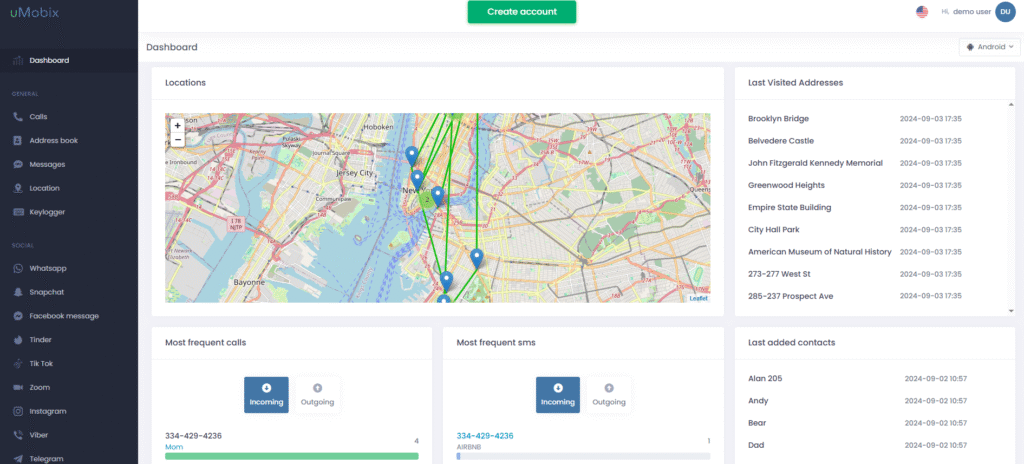
📞 Calls & Messages Tracking
If staying aware of conversations really matters to you, this is where uMobix shines. It logs call history — incoming, outgoing, missed — alongside regular SMS messages. On Android, this tracking is smooth and near real-time, and in many cases you can even see detailed timestamps and contact names. What I liked most is how neatly the information appears inside the dashboard, making it easy to scan through conversations without feeling overwhelmed. However, keep in mind that on iOS, message tracking depends heavily on iCloud sync, which may occasionally delay updates.
📍 Location Tracking
Location tracking in uMobix gives you a clear idea of where the device has been and where it is now. For parents who worry about a child’s commute or sudden detours, this can bring real peace of mind. Android users typically get more accurate and frequent updates, while iPhone location rely on Apple’s backup timing. Still, the visual map layout in the dashboard makes it easy to follow movement at a glance. It’s not perfect real-time GPS, but it’s dependable enough to help you stay informed.
⌨️ Keylogger
The keylogger is one of uMobix’s strongest — and most powerful — features. It records the keystrokes typed on the device, including messages, search queries, and usernames. This gives you deep insight into what someone is doing, even if they delete the content later. On Android, this works exceptionally well; almost everything typed gets captured. iOS is more restricted for privacy reasons, so results vary. It’s an advanced tool, and you’ll want to use it responsibly and legally, but when it works, the visibility it provides is unmatched.
💬 Social Monitoring
If your primary concern is social media usage, this feature will matter to you the most. uMobix monitors activity across apps like WhatsApp, Instagram, Facebook, Snapchat, Tinder, and more. You’ll see messages, call logs, media shared, and sometimes deleted content depending on the platform. On Android, this coverage is impressive and often more complete than many competitors. On iPhone, the data can be more limited because Apple locks down app access — but you still get useful snapshots. The interface makes switching between apps quick and intuitive.
🖼️ Photo & Video Monitoring
With this feature, you can view the device’s stored photos and videos directly from your dashboard. It’s incredibly helpful for parents wanting to ensure their child isn’t engaging with inappropriate media or dangerous contacts. The layout is simple: thumbnails load quickly, and you can tap or click to enlarge any file. Android devices typically sync new media faster, while iOS updates depend on iCloud backup cycles. Still, the overall visibility is solid, and most users find it reliable enough for daily monitoring.
🌐 Browser History Tracking
Browser history tracking lets you see what websites have been visited, including timestamps and domain names. If you’re concerned about mature or harmful web content, this feature can give you instant clarity. On Android, the browsing data generally appears quickly and consistently. On iOS, results depend on Safari data syncing with iCloud. The dashboard organizes everything neatly, so you can easily spot trends or frequent visits. It’s a straightforward feature — but an important one for parental monitoring.
💰 uMobix Prices and Subscriptions
Here’s the current pricing breakdown for uMobix.
| Plan Duration | Price per Month |
| 1-Month Plan | $49.99/month |
| 3-Month Plan | $29.99/month |
| 12-Month Plan | $12.49/month |
💬 uMobix Support
When you’re dealing with a monitoring tool that relies on proper device permissions, customer support becomes more than a convenience — it turns into a lifeline. uMobix performs well here, especially for users who may feel unsure during the installation process. Many reviewers highlight the fast response times through live chat and email, noting that agents often guide them step-by-step, which can be incredibly reassuring when handling sensitive device settings. This immediate assistance can turn a potentially confusing setup into a smooth, confidence-building experience.
Beyond quick replies, the support team shows strong technical knowledge and real-world understanding. They help users navigate tricky areas such as accessibility permissions on Android or iCloud sync issues on iOS. Reviewers consistently mention cases where support clarified small but important mistakes that could have derailed the installation. While some users report slower replies during busy hours, the overall impression is that uMobix support is capable, patient, and effective at resolving issues quickly.
👉 Read our full mSpy review
⭐ uMobix User Reviews
Check out uMobix reviews on independent platforms such as Trustpilot and other platforms to discover what real users are saying about their experiences.
“Honestly, umobix has been a lifesaver. I had a feeling my husband was sneaky, and with this app, I was finally able to see the truth. The setup was easier than I thought, and once it was running, I could check his messages, calls, and even social apps without him knowing. It gave me clarity I needed instead of just guessing” — Nahi Jalo on Trustpilot.
“This is the best smartphone monitoring app I’ve come across. Customer service is on point, super quick response always. Nicky Brown is very knowledgeable and always willing to go the extra mile. I swear by this app and have been using it for the last 5 years, maybe a little less, but I will continue to bc not knowing is something I can’t deal with or being lied to.” — Millard Gervais on Trustpilo.
Final Verdict: Is uMobix Good?
Yes — uMobix is a powerful monitoring tool, especially for parents who want deep visibility into a child’s calls, messages, social apps, and location. It works best on Android, where features are most complete and updates are more consistent. However, it’s not a traditional parental-control app; it focuses on monitoring rather than screen-time limits or app blocking. iOS users may also see reduced functionality due to Apple restrictions. If you need detailed tracking and don’t mind the setup process, uMobix is a strong choice. If you prefer simple controls or lighter supervision, other apps may fit better.
Related Posts 👇
- SpyX Review 2026: Does It Really Keep Kids Safe?
- uMobix vs Eyezy: Which is Best Parental Control Tool?
- Lloyds IT glitch exposes 447,936 customers’ data in banking wake‑up call
- What Is Anthropic’s Claude Code Security And How Does It Work?
- 5 Best Snapchat Monitoring Apps for Parents (2026)
uMobix FAQs
Who is uMobix best for?
As mentioned above — it’s best for users who want detailed monitoring of device activity (calls, texts, location, social media) and are comfortable with turning on full-scale tracking rather than just light parental control.
Is uMobix legit?
Yes. The app appears to be legitimate — many users report it works and performs as advertised, and the company provides live demos and subscription plans. For example, Cybernews says, “Yes, uMobix seems to be a legitimate company. User reviews indicate that the company responds to customers’ questions and complaints.”
However, “legit” does not mean “fits every use case”. You must still ensure you use it legally and ethically.
Is it legal to use uMobix?
Yes. However, legal status depends entirely on your jurisdiction and how you use it. In many places, monitoring a device you own (e.g., your child’s phone) with their knowledge may be permissible; monitoring someone’s phone without consent could violate privacy, wire-tapping or computer-misuse laws. You should check local legislation or consult a legal advisor if in doubt.
Does uMobix offer a free trial?
No. There’s no full free trial. You can use a live demo to explore the dashboard, but you need to purchase a subscription to monitor a real device.
Does uMobix support multiple devices under one plan?
No. Generally, each subscription covers one target device. If you want to monitor multiple devices, you will likely need separate subscriptions (which increases cost).