 Benny Morgan
 Karla Spencer
When parents search for a phone monitoring solution, they rarely search with curiosity—they search with concern. Queries like “Is Eyezy legit?” “Is Eyezy safe?” “Can Eyezy monitor WhatsApp?” “Is Eyezy detectable?” reflect deeper fears about online predators, cyberbullying, explicit content exposure, and excessive screen time. In this Eyezy review, we evaluate whether Eyezy is a trustworthy spy app—or simply another surveillance tool with bold marketing claims.
Eyezy positions itself as a parental monitoring application designed to give guardians visibility into a child’s smartphone activity. It advertises features such as call log tracking, text message access, GPS location monitoring, social media surveillance, keyword alerts, and web browsing history reports. In some configurations, it also operates discreetly in the background, which raises both practical benefits and ethical questions.
But determining whether Eyezy is trustworthy requires more than listing features. A legitimate monitoring app must be evaluated across several critical dimensions: legality of use, data encryption standards, installation requirements (including rooting or jailbreaking), dashboard security, customer support transparency, subscription policies, and compliance with privacy regulations. Because monitoring software handles highly sensitive personal data, security architecture and responsible usage guidelines are just as important as tracking capabilities.
Additionally, parental control tools generally fall into two categories: balanced digital wellness apps (focused on content filtering and screen-time management) and surveillance-focused monitoring apps (prioritizing message and activity tracking). Understanding where Eyezy fits within this spectrum helps clarify whether it aligns with your parenting approach.
In this comprehensive review, we analyze Eyezy’s core monitoring features, technical setup process, pricing structure, security framework, legal considerations, and overall value. Our goal is to provide a structured, fact-based assessment so parents can determine whether Eyezy is a safe, legitimate, and reliable solution for monitoring their child’s digital activity.
Eyezy Review: Quick Overview
Eyezy is an advanced phone monitoring app built for parents who want detailed visibility into their child’s smartphone activity. Rather than focusing primarily on screen-time limits or simple app restrictions, Eyezy emphasizes comprehensive activity tracking. Parents can monitor text messages, social media conversations, GPS location, call logs, photos, browsing history, and even keystrokes typed on the device.
Eyezy is particularly suited for situations where parents suspect serious issues—such as cyberbullying, unsafe online relationships, or contact with potential predators—and require deeper insight to intervene effectively. Its dashboard is modern and user-friendly, making it relatively easy to navigate reports, set up geofencing zones, and receive real-time alerts about location changes or flagged keywords.
That said, Eyezy is not a traditional parental control app focused on digital wellness. It offers limited content filtering, lacks robust app blocking, and does not provide strong screen-time management tools. The installation process may also involve technical steps, depending on the device and desired features. Additionally, its pricing is higher than many competing family safety apps.
If your priority is thorough monitoring and granular tracking data, Eyezy stands out as one of the more powerful solutions available. However, if your goal is to establish healthy digital boundaries with straightforward restrictions, other family tracking or parental control apps may be a better fit.
| 👍 Pros | 👎 Cons |
|---|---|
| Eyezy includes a web-magnified feature that lets you see which websites your child has bookmarked. It’s a simple but powerful way to understand what they’re curious about online. | Eyezy works best when the target device is jailbroken. Without that step, some advanced features either won’t work or will be limited, which can be frustrating for parents who prefer a simpler setup. |
| One of my favorite parts of using Eyezy is the ability to remotely block any app or specific website on my child’s iPhone. When something felt unsafe, I could shut it down instantly without touching their device. | The location tracking feature only works after turning on Apple’s Family Sharing option. It’s an extra setup step, and not every parent wants to connect their accounts this way. |
| You’ll get notified the moment your kid connects to a Wi-Fi network—whether it’s at home, school, or somewhere unexpected. This tiny feature adds a surprising layer of peace of mind. | |
| Combined with its other monitoring features, Eyezy gives you a deeper look into your child’s digital habits, helping you step in before problems escalate. |
What We Consider When Testing Apps
The SafetyDetectives team puts every app through a hands-on, real-world testing process to see how it performs in everyday parenting scenarios. We focus on accuracy, reliability, and user trust so you know exactly what to expect before installing any tool.
- Installation & Setup: How easy it is to install, configure permissions, and get the app running on Android and iOS.
- Feature Performance: Whether monitoring tools (location, chats, media, alerts) work consistently and update in a reasonable timeframe.
- Privacy & Security: How the app handles sensitive data and whether it follows safe, ethical monitoring practices.
- Pricing & Value: Whether the subscription cost matches the quality, reliability, and features offered.
- User Experience: Insights from long-term user reviews to reveal issues or strengths not visible in short-term testing.
👉 Click here to explore the complete mSpy Review!
Top uMobix Alternatives
| Feature / Service | uMobix | mSpy | ClevGuard | Spynger |
|---|---|---|---|---|
| Our Review | Read uMobix Review | Read mSpy Review | Read ClevGuard Review | Read Spynger Review |
| Starting Price | $49.99/month | $48.99 / month | $49.99 / month | $47.10 / month |
| Free Trial / Demo | Demo available | Demo available | Demo available | Demo available |
| Money-back Guarantee | 14 days | 14 days | 30 days | 30 days |
| Number of Devices | 1 per license | Up to 3 | Not specified | 1 per license |
| Supported Platforms | Android, iOS | Android, iOS | Android, iOS, Web | Android, iOS |
| Screen Recorder | ✔️ | ✔️ | ✔️ | ✔️ |
| Ambient Sound Recorder | ✔️ | ✔️ | ✔️ | ❌ |
| Parental Control Tools | ✔️ | ✔️ | ✔️ | ✔️ |
| Keylogger | ✔️ | ✔️ | ✔️ | ✔️ |
| Call Recording | ✔️ | ✔️ | ✔️ | ✔️ |
| GPS Tracking | ✔️ | ✔️ | ✔️ | ✔️ |
| Social Media Monitoring | ✔️ | ✔️ | ✔️ | ✔️ |
| Website Blocker | ✔️ | ✔️ | ✔️ | ❌ |
| Link | Get Started | Get Started | Get Started | Get Started |
What Is Eyezy?
Eyezy is a phone monitoring app designed to give parents a clear window into their child’s digital life. Instead of focusing on simple restrictions like screen-time limits or basic content filters, Eyezy takes a deeper approach by showing you how your child uses their device and who they’re interacting with.
Once installed on a child’s Android or iOS device, Eyezy quietly collects activity and sends it to an easy-to-use dashboard. You can see things like text messages, social media chats, GPS location, saved photos, call logs, and even keystrokes. Many parents turn to Eyezy when they feel something is “off” and need real insight—whether it’s bullying, risky friendships, or exposure to inappropriate content.
How Eyezy Works
Eyezy works by quietly collecting data from your child’s smartphone and sending it to a secure online dashboard that only you can access. Once installed on the target device, the app runs in the background without interrupting normal phone use, allowing you to monitor activities in real time or whenever you check the dashboard.
Here’s a simple breakdown of how it works:
1. Installation on the Child’s Device
- You create an Eyezy account and choose a plan.
- Eyezy guides you through installing the app on your child’s Android or iOS device.
- After permissions are granted, the app begins collecting data immediately.
2. Data Collection in the Background
Eyezy monitors device activity such as:
- Messages & Social Apps: Reads texts, chats, and keystrokes.
- Location Tracking: Logs real-time movements and location history.
- Photos & Media: Shows stored images and videos.
- Web Activity: Displays visited sites, bookmarks, and browser actions.
3. Secure Dashboard Access
- All collected data appears in your Eyezy dashboard.
- You can log in from any browser to view chats, locations, screenshots, and alerts.
4. Optional Controls
Eyezy also allows certain remote actions, like:
- Blocking apps or websites
- Setting geofence zones
- Receiving Wi-Fi connection alerts
👉 Thinking of using uMobix? Read the full uMobix review before you decide!
Who is Eyezy Best For?
Eyezy is best for parents who want deep insight into their child’s digital world rather than simple screen limits or app timers. If you’re concerned about online risks like bullying, inappropriate conversations, or contact with strangers, Eyezy gives you the kind of detailed monitoring that traditional parental control apps often can’t match.
It’s ideal for:
- Parents of pre-teens and teens who use social media heavily and may hide risky behavior.
- Families face safety concerns, whether emotional, social, or environmental.
- Parents who need proof or clarity—Eyezy’s logs, screenshots, and chat monitoring provide concrete information.
- Those who are tech-comfortable, since installation can involve multiple steps and permissions.
- Parents are looking for location awareness, including geofencing and movement history.
Key Features Review of Eyezy
Dashboard
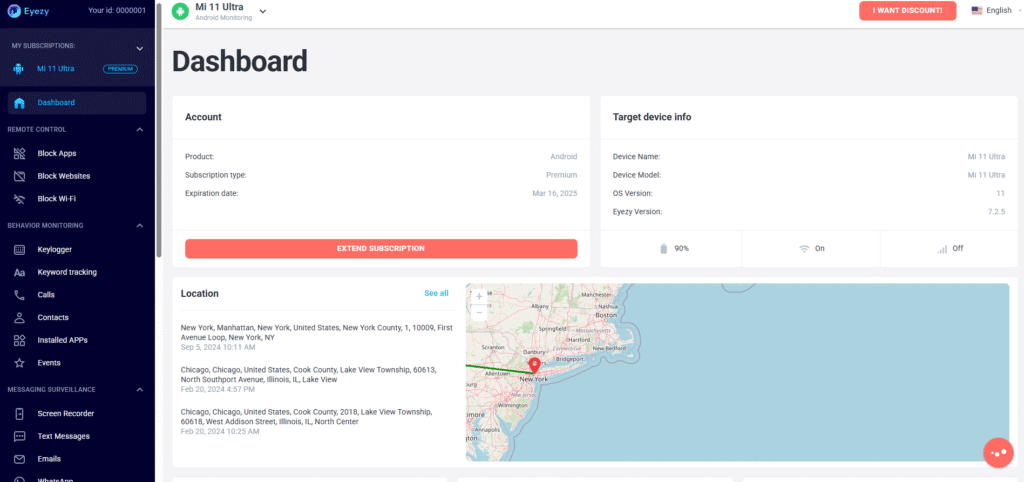
Eyezy’s dashboard feels like mission control for your child’s digital world. The moment you log in, everything is laid out clearly—messages, locations, alerts, screenshots, and more. You don’t need tech skills to use it; the dashboard does the organizing for you. It helps you quickly spot unusual behavior, track daily activities, and stay ahead of potential risks. Instead of digging through menus, you get a simple, real-time snapshot of your child’s safety.
Calls & Text Messages
Eyezy lets you see incoming and outgoing calls, as well as text messages, so you know who your child is talking to and how often. If a new number appears or conversations suddenly change tone, you can step in early. This feature gives you a comforting layer of clarity—especially if you’ve wondered whether your child might be dealing with bullying, peer pressure, or unwanted contact.
Block Apps and Websites
Whenever something feels unsafe—maybe a risky social app or an inappropriate website—you can block it instantly from your Eyezy dashboard. You don’t have to touch your child’s phone. It t takes just one click, and the app or site becomes inaccessible. It’s a reassuring way to create boundaries without arguing, negotiating, or constantly monitoring their device in person.
Keyword Tracking
With keyword tracking, Eyezy alerts you anytime your child types or receives specific words or phrases you’re worried about. Think of terms related to bullying, self-harm, drugs, meeting strangers, or explicit content. Instead of reading every message, Eyezy quietly flags the moments that matter, helping you step in before a small issue turns into something serious.
Keylogger
Eyezy’s keylogger keeps a detailed record of what’s typed on your child’s device. It’s especially helpful for uncovering hidden conversations, social media handles, or secret accounts. While powerful, it’s also a feature you’ll want to use thoughtfully—it gives you deep insight into what your child is saying and searching for, helping you spot patterns and concerns you may have otherwise missed.
Screen Recorder
This feature captures periodic screenshots of your child’s device, giving you a clear picture of what they’re doing in real time. It’s incredibly useful for apps that don’t always share detailed data. Whether they’re browsing, chatting, or using social media, you’ll see exactly what appears on their screen. It’s a confidence-building layer of transparency for modern parenting.
WhatsApp Monitoring
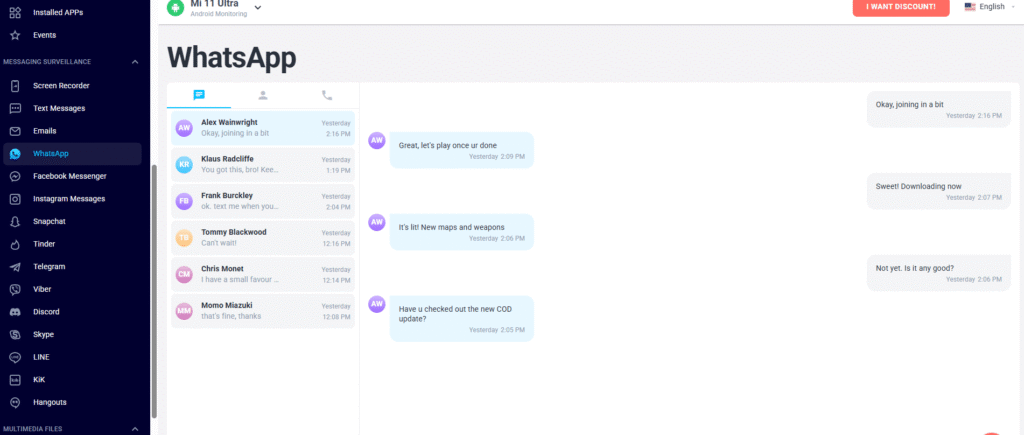
If your child spends a lot of time on WhatsApp, Eyezy keeps you updated on chats, media, and contact interactions. You can see conversations, timestamps, and sometimes deleted messages, giving you deeper awareness of who they’re talking to and what’s being said. In an age where most communication happens privately, this feature fills in the gaps.
Social Media Monitoring (Facebook, Instagram, Snapchat, Tinder)
Eyezy taps into today’s most popular social platforms to show you what your child posts, receives, and interacts with. Whether it’s Instagram DMs, Facebook chats, Snapchat content, or even Tinder use (a red flag for minors), you’ll have visibility that helps you guide them safely. This isn’t about invading privacy—it’s about staying ahead of the platforms where risks often hide.
Photos & Videos
Eyezy gives you access to the photos and videos saved on your child’s device. It’s one of those features that quietly makes a big difference. Whether you’re concerned about explicit images, inappropriate memes, or files that hint at emotional distress, seeing their stored media helps you understand what they’re exposed to and sharing.
GPS Location
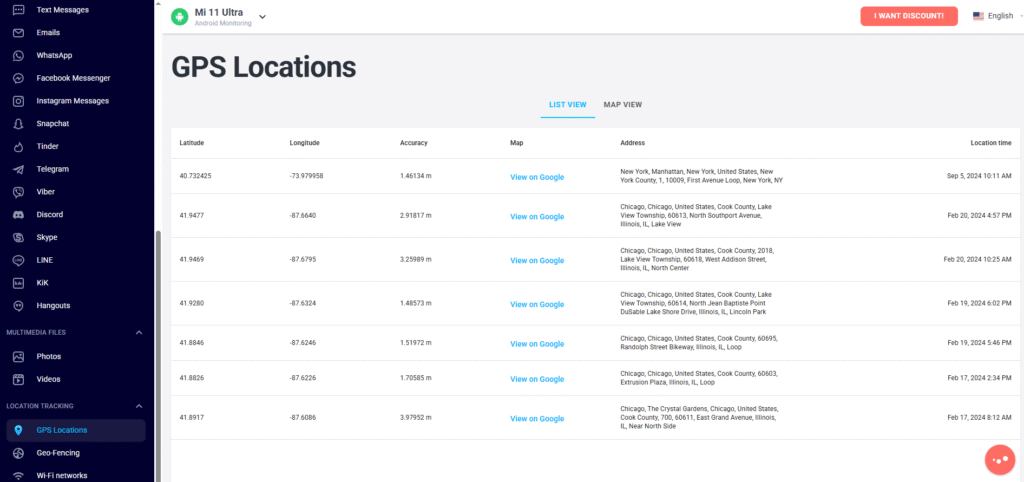
Eyezy’s GPS tracking shows you exactly where your child is at any moment and lets you look back at where they’ve been. It’s a feature that brings peace of mind on hectic days—whether they’re walking home, at practice, or simply late after school. Knowing their location removes guesswork and reduces worry.
Geo-Fencing
Geo-fencing lets you create safe or restricted zones on the map—home, school, a friend’s house—and Eyezy alerts you the moment your child enters or leaves them. It’s one of the most helpful features for parents who want gentle oversight without constant check-ins. You get automatic updates that reassure that your child is moving safely through their day.
💰 Eyezy Prices and Subscriptions
Here’s the current pricing breakdown for Eyezy.
| Plan Duration | Price per Month |
|---|---|
| 1-Month Plan | $38.39/month |
| 3-Month Plan | $22.39/month |
| 12-Month Plan | $7.99/month |
💬 Eyezy Support
Eyezy offers several support options to make sure you’re never left guessing when you need help. Their 24/7 English phone support is available at +1 (844) 606-3888, which is toll-free for users in the USA and Canada. If you prefer quick, real-time assistance, Eyezy also provides 24/7 live chat, making it easy to connect with a support agent anytime you run into setup issues or feature questions.
For non-urgent concerns, you can reach the team through support@eyezy.com, where responses are typically friendly and solution-focused. Eyezy also maintains an extensive FAQ section, giving you instant answers to the most common troubleshooting topics. Their community forum offers another space to learn from other users’ experiences. Plus, Eyezy stays active on social media, so you can follow updates, feature announcements, and additional support content. Overall, Eyezy’s support system is available around the clock and covers every communication style.
Eyezy User Reviews
Check out Eyezy reviews on independent platforms like Trustpilot to see what real users are saying about their experience with the app.
“Nice work! The support was great — the Eyezy team helped me very quickly, and I even received a small welcome discount. The service works perfectly and delivers exactly what it promises. Definitely recommended!” — Kristian on Trustpilot
“I absolutely love Eyezy’s keylogger feature! It keeps me informed about what’s being typed on my kid’s devices, and the deleted messages tracking is a huge bonus. Setup was quick, easy, and the dashboard is super user-friendly!” — Brucel on Trustpilot
Final Verdict: Is Eyezy Good?
Eyezy is a strong choice if you need deep insight into your child’s digital world. Its monitoring tools—like social media tracking, keylogging, and GPS location—offer visibility that many parental control apps can’t match. It’s especially useful for parents worried about online risks or wanting clear answers rather than guesswork. However, Eyezy isn’t ideal if you want simple screen-time limits or broad content filtering. It’s best for families seeking monitoring, not digital management.
Eyezy FAQs:
What is Eyezy used for?
Eyezy is used to monitor a child’s smartphone activity and help parents stay aware of their digital behavior. It tracks messages, social media interactions, locations, app usage, photos, and more from a single dashboard. The goal is to improve safety, identify risks early, and give parents clear insight without constantly checking the child’s device manually.
How does Eyezy stay hidden on a monitored device?
Eyezy can run in stealth mode by hiding its icon and background processes once installed, making it difficult for the user to detect. It operates quietly, collecting data and sending it to your dashboard without disrupting normal phone activity. This helps parents monitor discreetly while keeping the device functioning as usual.
Can Eyezy monitor social media conversations?
Yes. It can capture chats, media, and activity from several major social apps, giving you visibility into who the user interacts with and how often. While the depth of monitoring may vary by device, it’s designed to help you detect potential risks, keep communication patterns in check, and respond quickly when something seems concerning.
Does Eyezy track a device’s real-time GPS location?
Yes. The app updates location data regularly, letting you see where the device is and where it has been throughout the day. This is helpful for ensuring safety, monitoring travel routes, and confirming arrivals at school or activities. You can also set virtual boundaries to get alerts when the user enters or leaves a specific area.
Is Eyezy’s dashboard easy for beginners to understand?
Yes. The dashboard is designed to simplify complex data by organizing messages, locations, media, and alerts into clear sections. Even users with no technical background find it intuitive. This helps you quickly identify unusual behavior and manage everything without feeling overwhelmed.
Can Eyezy control screen-time schedules like a traditional parental app?
No. It focuses more on monitoring than managing daily device limits. While it can block some apps or websites, it doesn’t offer full scheduling features such as bedtime restrictions or timed usage controls. If you need detailed screen-time management, you may want a more dedicated tool for structured daily device rules.
Does Eyezy work without rooting/jailbreaking?
Yes, Eyezy works without rooting or jailbreaking, but some features may be limited. Most core tools—like location tracking, messages, browsing activity, and app monitoring—function normally on standard devices. Rooting or jailbreaking simply unlocks deeper data access, so Eyezy encourages choosing the setup that matches your comfort level and monitoring needs.
Does Eyezy drain battery?
Eyezy does use some battery because it runs in the background, but the impact is generally moderate. Most users report normal device performance, especially when features are optimized in settings. Occasional battery dips may happen during heavy data syncing or location tracking, but overall, Eyezy is designed to operate efficiently without noticeably affecting daily usage.
Will Eyezy introduce more advanced AI features in future updates?
Yes. According to industry trends, next-generation monitoring apps plan to integrate AI-driven sentiment tracking, voice emotion recognition, and predictive alerts. Eyezy’s 2025 roadmap hints at expanding its AI capabilities to better detect mental-health red flags and contextual risk patterns.